
We’re thrilled to announce Plover Kit v1.7.0 — a major update that transforms how you create, manage, and embed custom code snippets across your WordPress site. We have redesigned the code snippet module. Whether you use the free or premium version, you’ll find new flexibility, a polished interface, and robust safety features that put you in full control. Here’s everything you need to know.
What’s New in v1.7.0
1. Expanded Snippet Types (HTML, CSS, JS, PHP)
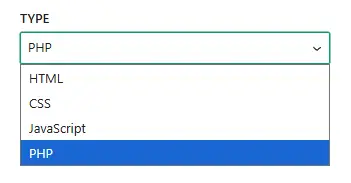
Previously, our code snippet module only supported HTML code snippets. Version 1.7.0 introduces full editing and execution support for HTML, CSS, JavaScript, and PHP.
- HTML, CSS, JavaScript – Completely free. Style your frontend, add dynamic behavior, or inject markup with ease.
- PHP – A premium feature. Run server‑side logic directly from the snippet editor, with all the power and responsibility that entails.
Each code snippet type has its own tailored syntax highlighting, and appropriate location options (see below).
2. Smart, More Precise Location Options
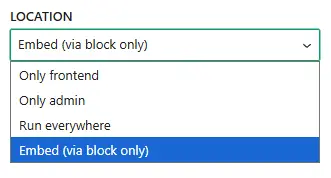
We’ve rethought “where your code runs” to give you clearer control. All snippet types now share a consistent location logic, plus a brand‑new “Embed (via block only)” mode.
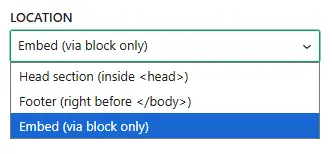
HTML Snippets
-
Head section (inside
<head>) – ideal for meta tags, analytics scripts, or font loading -
Footer (right before
</body>) – ideal for deferred scripts or footer banners.
CSS, JavaScript & PHP Snippets
- Only frontend – loads exclusively on the visitor‑facing side of your site.
- Only admin – loads only inside the WordPress dashboard.
- Run everywhere – loads on both frontend and admin.
New: Embed (via block only) – Available for All Types
Snippets set to this location will not run globally. They will execute only where they are explicitly inserted via the Gutenberg Block.
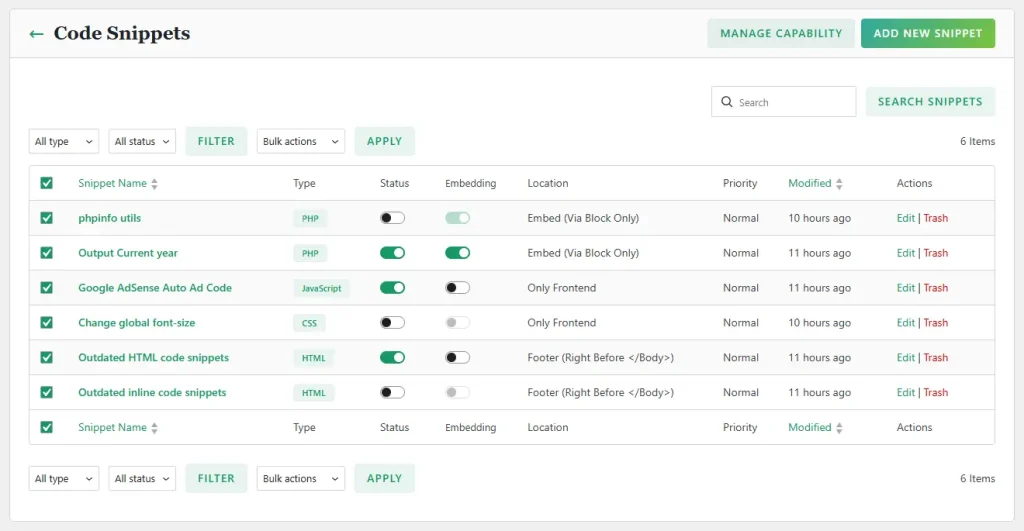
3. Redesigned Snippet List UI with Filters & Trash
Managing dozens of snippets is now smoother than ever. The snippet list has been rebuilt with:
- Quick filters by code type, status, and premium features.
- Trash support — delete a snippet and it goes to the trash first, ensuring you never accidentally lose a snippet.
- Bulk actions to enable, disable, delete or restore multiple snippets at once.
Safer Embedding — Permission Controls & Block Validation
In 1.7.0, we took a giant leap forward in securing code execution across multi-author sites. To prevent unauthorized users from embedding code or executing arbitrary scripts, we have rebuilt the embedding workflow from the ground up.
1. Allow Embedding Toggle
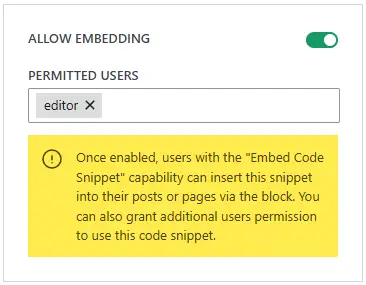
Snippets will no longer be embeddable by default. For a snippet to function inside a Gutenberg block, it must have the Allow Embedding option explicitly toggled ON, and the snippet itself must be active. This prevents inactive or internal snippets from accidentally appearing in your content.
2. Role-Based & Per‑Snippet User Permissions
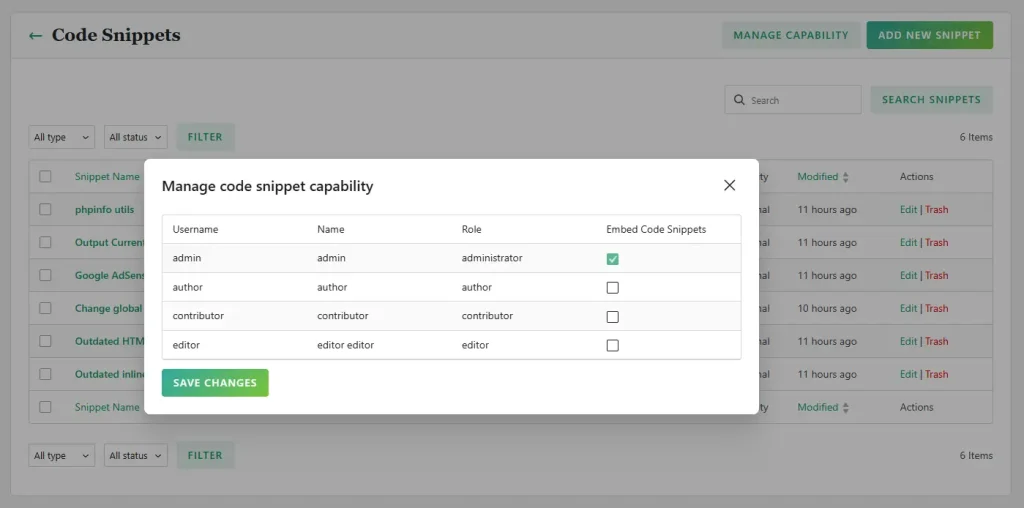
- Role-Based Permissions: By default, only Administrators can insert code snippet blocks into posts or pages. However, Administrators can grant embedding permissions to other user roles (e.g., Editors or Authors) via the settings page.
- Per-Snippet User Authorization: Admins can also specify authorized users directly within an individual snippet’s edit screen. An assigned user will be allowed to embed that specific snippet, even if they do not hold general code embedding permissions across the site.
3. Shortcode Deprecation & Secure Block Engine
To guarantee maximum security, every time a post containing an code snippet block is saved, our plugin generates a dynamic Security Token bound to the author, the snippet ID, and the exact contextual environment.
Because classic shortcodes cannot securely store or validate dynamic token context, shortcodes have been officially deprecated in version 1.7.0 in favor of the enhanced Gutenberg Block.
Going forward, always use the dedicated Plover: Code Snippet Block in the block editor. The block carries all the necessary information for the plugin to verify and render the snippet safely.
Migration & Troubleshooting Guide
Because of these crucial security changes, previously inserted shortcodes and blocks will cease to function immediately after updating to 1.7.0.
If you are a logged-in user viewing a page with a legacy shortcode or an unverified block, you will see a clear error message guiding you on how to restore it:
Using shortcodes to run code snippets is unsafe and has been disabled, please use the “Plover: Code Snippet” block instead.
— Deprecated shortcode notice —
Security token is missing. Please edit and resave your post to generate one, or re-insert this code snippet using the “Plover: Code Snippet” block.
— Unverified code snippet block notice —
How to restore your embedded snippets:
To make your existing embedded snippets work again, please follow these 5 simple steps:
- Enable Embedding: Go to your Snippet List, edit the target snippet, turn ON the Global enable and Allow embedding option, and save it.
- Change Location (if applicable): If you do not want the code snippet to run globally, set the location to “Embed (via block only)” and save it.
- Find Legacy Embedded Snippets: Open each post or page where you inserted a code snippet block/shortcode.
- Replace Shortcodes (if applicable): If you were previously using a shoercode , remove the shortcode, and insert the Plover: Code Snippet Block instead.
- Re-save the Post/Page: This forces the plugin to generate a new security Token for the block, and the snippet will render immediately.
Workaround: Using Shortcodes Where Blocks Aren’t Supported
We understand that certain theme options, widgets, or classic page builder setups do not support Gutenberg blocks natively. If you still need shortcode functionality in these areas, you can easily create your own custom shortcode using a PHP Snippet.
Here is how to do it:
- Create a new snippet and set the code type to PHP
- Set the location to Only frontend or Run everywhere, and activate the snippet.
- Add the following code snippet to register your custom shortcodes and place your desired functionality in the callback, then you can place [my_custom_code] anywhere shortcodes are supported, such as theme option fields, classic widgets, or page builders:
<?php
// Register a custom shortcode inside a PHP Snippet
add_shortcode('my_custom_code', function($atts, $content = null) {
    ob_start();
    ?>

    <!-- Write your custom HTML, CSS, JavaScript or PHP here -->
    <div class="my-custom-box">
        <p>This code is rendered via a custom PHP shortcode!</p>
    </div>

    <?php
    return ob_get_clean();
});
Frequently Asked Questions
I upgraded and my old snippets disappeared from the frontend. What happened?
The old shortcodes and blocks are no longer valid. Follow the migration steps above — enable embedding on each snippet and re‑insert the snippet block, then re‑save the post.
Can I still use shortcodes?
Official snippet shortcodes have been removed for security reasons. Please use the Code Snippet Block. However, if you need shortcodes for areas that don’t support blocks, you can create custom shortcodes via a PHP snippet (see above). This requires the premium version.
I’m the admin. How do I let my editors embed snippets?
Go to Plover Kit → Modules → Code Snippets → Settings, click the “Manage Capability” button, and enable Embed Code Snippets capability for the Editor role (or any other role you choose). You can also grant the capability to individual users in the code snippet editor screen.
Can I allow a user to embed just one specific snippet?
Yes. Edit the snippet, turn on “Allow Embedding”, and add that user to the “Permitted users” field. They’ll be able to embed this snippet even if their role doesn’t normally have permission.
What happens to snippets I don’t want to embed — do they still run globally?
Yes. As long as they’re enabled and have a global location (Head, Footer, Frontend, Admin, etc.), they will run everywhere according to that location. The “Embed” location is simply a new option for when you want zero global footprint.
Are PHP snippets and embedded code snippet available in the free version?
No. PHP snippet support and embedded code snippet is a premium feature. Global HTML, CSS, and JavaScript code snippet remain free.
Conclusion & Support
Plover Kit Version 1.7.0 is a massive update to the code snippet module, designed to make your code snippets management cleaner, more powerful, and significantly more secure. We strongly recommend updating today and performing the migration steps for any embedded content.
If you encounter any issues or have questions about the update, feel free to reach out through our official support forum. Thank you for your continued support!