
This is a module of the Plover Kit plugin (Version v1.5.3 or above), you must install this plugin to access the features below.
An awesome extension for creating annotations and animating text and headings on WordPress pages.
Rough Notation creates a hand-drawn look and feel. Text and headings can be annotated in many different styles. Animation duration can be configured or just turned off.
You can enable this module via “WordPress Dashboard -> Plover Kit -> Modules -> Rough Notation“
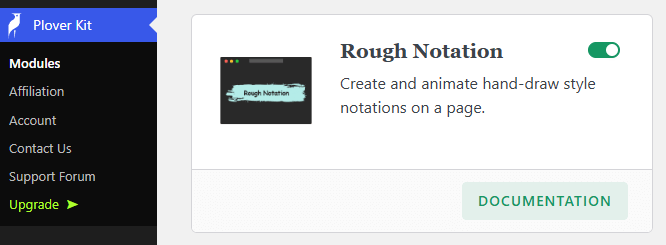
Enable Rough Notation Effect
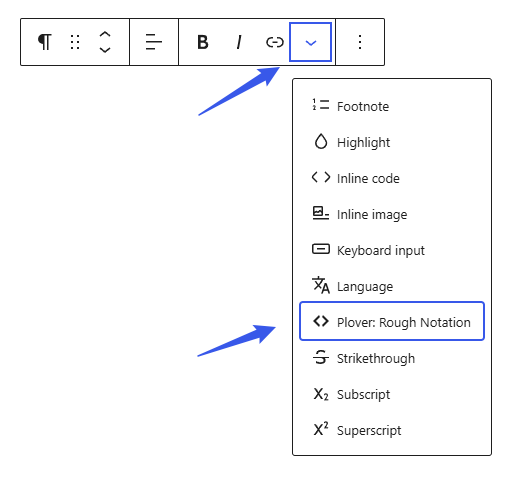
Rough Notation effect is available through the rich text formatting toolbar. When you select a piece of text in a Paragraph or Heading block, you can enable the Rough Notation effect for the selected text with the More options menu in the Rich Text toolbar.
Rough Notation Options
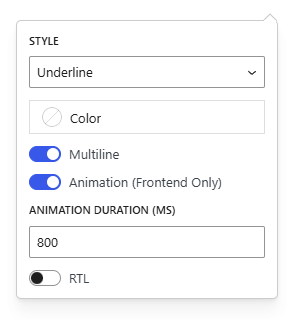
Here is the Rough Notation option, where you can select a style to enable it, and you can also animate it.
Animations and more styles are only available in the Premium version.
Rough Notation Styles Preview
Underline Style
Create a sketchy underline below an element.
Highlight Style
Creates a highlight effect as if marked by a highlighter.
Wave Line Style
Create a sketchy wave line below an element.
Box Style
This style draws a box around the element.
Strike-Through Style
Draw a hand-drawn line through an element creating a stroke-through effect.
Crossed-Off Style
To symbolize rejection, use a crossed-off effect on an element.
Brackets Style
Create a hand-drawn bracket around an element.
Leave a Reply